Full Pull Orbit Gameplay Ability Blueprints:
REGRADABLE
TECHNICAL DESIGNER AND 3Cs DEVELOPER
Play as ELI, a discarded worker robot revived by the last Tree of Life. This action-platformer follows ELI's journey through a city overrun by technology as he carries the tree's final seed, determined to restore nature to a world that has forgotten it. Swing through the city, battle dangerous enemies, and protect the seedling as you fight to bring life back to a dying world.
Made by Sunpress Games
A 19-person Capstone project at Florida Interactive Entertainment Academy
WHAT I WORKED ON
CHARACTER MOVEMENT COMPONENT
Variable gravity and apex hold
I gave the character an upwards and a downwards gravity, which can be modified by ability and movement state.
As well as a way to hold the character at the apex of the jump for a moment.
Movement Showcase

WHY THIS WAS DONE
Make the playable character feel snappy, heavy, and give them time to react to air actions (since our game has a lot of air movement).
Multiple movement states with Data Tables
The player can run and sprint, as well as being launched by three different abilities.
Based on this, the character has four movement modes divided by:
Ground Movement
-
Running
-
Sprinting
Air Movement
-
Swing Launch
-
Pull Orbit Launch


WHY THIS WAS DONE
By having each category in a different Data Table, it allows for each row to be its own movement mode that can be dynamically created based on the game's needs.
Movement States Showcase

Dynamic context based acceleration and deceleration
My 3Cs research allowed me to implement a context-based system built on top of the CMC, which considers your current actions and adjusts either the acceleration or deceleration for an intentional and controlled movement feel.
The contexts are:
-
Speed up acceleration
-
Same direction acceleration
-
Opposite direction acceleration
-
Same direction deceleration
-
Opposite direction deceleration
-
No input deceleration
Dynamic Acc/Dec Showcase

WHY THIS WAS DONE
-
Different movement control when going from one movement state to the other
-
A more controlled and intentional level design based on what the character can do
-
Overall better character feel while playing, which sets it apart from default Unreal Engine settings
Smooth deceleration when moving around
We wanted to make the character go from a sprint to a running state by decelerating at a constant rate.
ISSUE:
Unreal's CMC makes it so when you rotate the character either by itself or the camera, some inherit forces get applied and the deceleration transition gets lost.
This also causes sliding due to how the CMC handles deceleration, which conflicts with the slow transition between movement states.
SOLUTION:
By using the player's current speed, velocity, and intended input direction, calculate an impulse to be applied to the character.
WHY THIS WAS DONE
Uninterrupted player direction control when decelerating between movement states, making the movement snappier and more responsive.
Default CMC Behavior

Modified Behavior

PULL ORBIT ABILITY
The player is able to grapple to an enemy and quickly pull themselves towards them to execute a counter and follow up with a launch. Optionally, they can steer their launch direction by orbiting around them a before reaching the counter window.
The ability was done using Unreal's Gameplay Ability System (GAS)
Acceleration and Deceleration in orbit rotation
The player is able to orbit clockwise and counterclockwise during the approach towards the enemy.
This movement includes a custom implemented acceleration and deceleration.
All done via Set Actor Location.
WHY THIS WAS DONE
To make a smoother and more natural flow of control, especially when switching directions mid-execution.
Rotation during Pull Orbit Ability
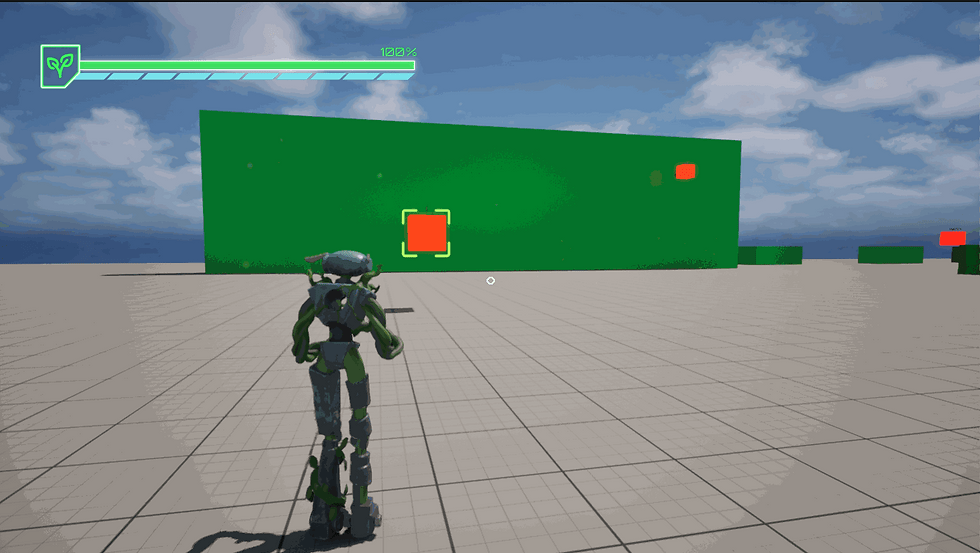
Starting direction and speed based on how you move when executing the ability
The faster the player is running when entering the ability, the faster the initial rotational speed.
Additionally, based on the direction they are moving, the ability will start in the corresponding direction as well.
-
If they are moving left: Clockwise
-
If they are moving right: Counterclockwise
Left/Right ability initialization

WHY THIS WAS DONE
Maintain momentum and consistency so that movement and abilities naturally flow and chain together.
Approach speed increase and preserving momentum
The approach speed during the Pull Orbit increases over time, making the final approach right before the counter much more satisfying and dynamic then if with a constant speed.
At the same time, the current speed of the player is considered when entering the ability, and it transfers to the approaching speed, preserving momentum.
Consistent speed and momentum

WHY THIS WAS DONE
More interesting, dynamic, and snappier character movement that feels consistent, entirely focused on 3Cs approach.
ZIPLINING ABILITY
The player can attach themselves to Ziplines placed in the levels, able to traverse them in the direction that they desire, boost, and un-mount them voluntarily by launching off of them.
These Ziplines are made of a two-point Spline with a Capsule collision, which points are able to be moved around for level designers.
It constantly detects the player while inside the Collision, and checks for valid height to allow the use of the ability. It lights up in green to signal that the ability can be used.
Dynamic initial velocity and manual direction change
The Zipline moves the character automatically, accelerating towards a target speed constantly keeping it active.
While the initial direction is determined by your velocity and by the camera (if you look towards what zipline end), you are also allowed to switch directions at any point.
The direction you move is determined by the dot product of the character's intended direction and the camera's current forward vector.
Base zipline movement

WHY THIS WAS DONE
Allow a layer of traversal mechanics to the player, that make them able to tackle enemy encounters in additional ways, as well as allowing more interesting level design and movement dynamism.
Boosting, launching and re-mounting
The player has these additional tools available to them during the ability:
-
Boosting along the zipline in any direction
-
Press the jump button at any point and launch themselves in the direction they are looking
-
After a small delay (to avoid spamming) they can re-mount the zipline once again
At the end of the Zipline, the player is launched automatically in the zipline's direction.
Zipline control

WHY THIS WAS DONE
Give the player more freedom, allowing them to play the way they want, which emphasizes game feel and the 3Cs approach to the design.
Multiple Zipline dynamic connections
Level designers are able to make their own zipline shapes by connecting two zipline points together.
Just place them on the level and the player character Blueprint will detect any adjacent zipline right before they were about to dismount.
Multiple ziplining

WHY THIS WAS DONE
Allow the level designers to make more fun levels by creating their own zipline shapes, which fit the vision of their respective work.
Full Ziplining Gameplay Ability Blueprints:
Get the Zipline's exact point that the player should be at (from the Zipline BP):


My work on this project was focused on 3Cs design and development, comprised of movement and traversal mechanics, to give the player a combat-esque gameplay while not having traditional combat mechanics.
Almost all of my work was done in Unreal Engine 5 Blueprints using Gameplay Ability System (GAS) as the foundation.
ADDITIONAL WORK
Sludge
There's a purple sludge in some of the levels, which if the player touches it, they become poisoned.
This causes the following:
-
Player is drastically slowed down
-
Effect lingers for a moment after exiting collider overlay
-
Visual effects applied that show you how much poison your character is currently affected by
Sludge puddles

Audio Management
Added spatial and ambient sound effects:
-
Neon signs
-
Trains
-
Cars
-
Enemy interactions
-
Ability interactions
All using audio attenuation.
Audio places

Camera Research
I was tasked with researching dynamic and cinematic camera angles that amplify the following:
-
A sense of speed when sprinting around
-
Locate swing points more easily
-
More cinematic feel where you can look at the character and the action on key moments

While I was not in charge of implementing them, I learned a lot about camera work in the process, and have written it down.
1-Page Designs
These are the one-page designs for multiple mechanics and/or features of our game.
Some of them were in the release, and some were not:


Ground Slam
Flying Cutter Enemy
Vine and Chain Reticles

Multiple Mechanics Research
These are various mechanics that I researched for our game.
By comparing how other games do it, I proposed a version of them for our own game.
These were not implemented in the final game.